You can prompt a brand video in a minute. So can everyone else, and the results rhyme. Scroll any feed and you will see the same launch clip wearing different logos. Competent, clean, and completely anonymous.
The instinct is to blame the model and wait for a better one. That instinct is wrong, and it is expensive, because the fix has been sitting in plain sight the whole time.
Why does every AI-made video look the same?
When the only instruction is "make me a launch video," the model reaches for the middle of everything it has ever seen. The middle is the same for everyone. The generic look is a briefing failure. Vague direction gets the statistical average of the training set, every single time, and no amount of prompt cleverness changes what an unbriefed render converges to.
You already solved this problem for text. Your voice rules, your banned phrases, your style guide pasted into every prompt. Brand-as-code for words. Video never got that layer, so every video starts from zero and lands on average.
A real studio never lets that happen. Before anyone renders a frame, a director has forced the look decisions. What world does this brand live in. What type. Where the accent color goes and where it never goes. Those decisions are the difference between a film and a demo, and they are exactly what one-shot prompting skips.
What actually fixes it?
A direction layer. I packaged the one I run my own brands on as video-direction, a free Claude Code plugin that puts a full studio process behind AI-made brand videos. It directs. HyperFrames, an open renderer, turns the direction into pixels on your machine.
Three moves do the work.
A brand interview writes your look down. You run /brand-init once, about 15 minutes. Almost every question is an A/B pick, taste by comparison, so you never need design vocabulary. Your answers become motion-brand.md, one file that holds your world, type, accent rules, style roster, and audio defaults. The interview ends by rendering a styleframe in your new brand, so you see it before you commit to a single video.
Six stages force the decisions. Ask for a video in plain language and the process runs treatment, style, boards, styleframes, build, and QC, with a gate at each stage. You approve two finished still frames before anything animates. Critics check the frames against a canon deck of best-in-class references before the render ever reaches you.
A ledger stops the repeats. Every finished video writes a row. The next video reads the ledger and varies on purpose, so video two carries the same brand as video one without recycling its look.
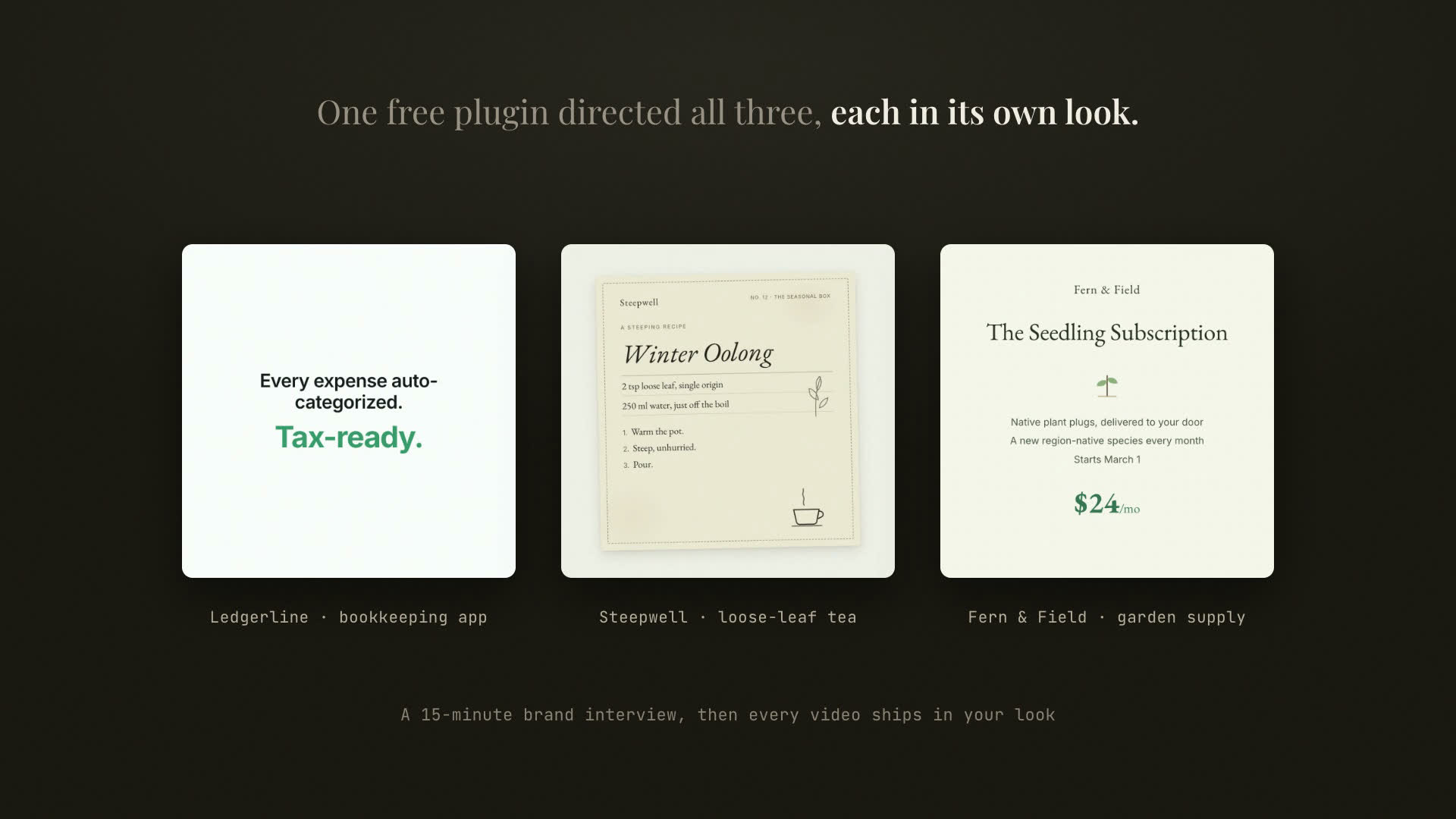
The film at the top of this post is the proof, and the plugin directed it about itself. Three brands walk through it. A bookkeeping app that asked to feel clean and not techy. A tea company that wanted to feel like a well-worn recipe book. A garden-supply shop that should sound like a good garden-center employee. Each brand was handed to the process in plain words, through a persona with zero design vocabulary, and each came out with a look that could not be swapped with the others. In a blind test run, that persona went from reading the README to a rendered on-brand video with no help and no dead ends.
What mistakes should you skip?
The plugin exists because my own studio process kept teaching me the same lessons at full price. Take them for free.
A process that assumes its renderer is internal tooling. The first extraction of my studio skill never named what turns direction docs into pixels. A test user sailed through treatment and boards, then stalled at build, because the handoff to the renderer lived in my head. If your process depends on a second tool, the handoff has to be written down or a stranger quits exactly there.
A preflight that cries wolf. The renderer's health check reports failure when optional extras are missing, even on a machine that renders fine. The first test user nearly quit at step zero over a red flag that meant nothing. Gate setup on required checks only. A false stop in the first minute costs you the users you will never hear from.
Promising a mechanic the build did not have. My flow contract promised the ledger. My telemetry counted styleframe re-rolls. Neither mechanic existed in the shipped skill until a pre-ship walk caught both. An instrumented field with no mechanic behind it is the most convincing kind of lie, because every dashboard agrees with it.
A redirect that eats your data. The plugin's opt-in event pings pointed at my apex domain, which silently redirects to www. The fire-and-forget curl never follows redirects, so every real event would have vanished while the endpoint tested perfectly. Test your instrumentation against the exact URL that ships, never the one that ought to work.
Frames nobody looked at. The first cut of the launch film passed every automated check while one caption sat unreadable on top of a light video clip, and two of the three exhibit brands read as the same wall of words. Automated critics catch structure. Only pulling stills and looking at them catches design. A frame you never looked at is a frame you never directed.
How do the numbers calibrate your decision?
Sparse, and only what helps you decide whether this is worth 20 minutes. The brand interview measured about 15 minutes with a design-blind user. The blind test run reached a rendered on-brand video with zero blockers. The 42-second launch film rendered in under 40 seconds on a laptop. The renderer's checker caught four real pre-render bugs across the film's production, each with a named fix. Silent renders are the default, and scoring is optional, with local keyless voice and music models or any track you drop in.
How do you install it?
Two commands inside Claude Code.
/plugin marketplace add derrtaderr/video-direction-plugin
/plugin install video-direction@video-direction
Then run /brand-init in your project and answer the interview. When it finishes, ask for your first video in plain language, pointed at something real. A launch page, a README, a post. The process takes it from there, and the worked example in the repo shows a complete brand kit and finished video you can read end to end.
You need Claude Code, Node 22 or newer, and ffmpeg. Everything renders on your machine with your keys. Nothing is hosted, and the only thing that ever leaves your machine is an anonymous install count, only if you opt in.
The full walkthrough lives at derr.ai/lab/video-direction. When your first video renders, post it to the repo's "Show your first video" discussion. Seeing a stranger's brand come out looking like nobody else's is the whole point.
FAQ
Does it generate video with AI? It directs. The plugin produces the brand file, boards, styleframes, and build contract, then HyperFrames renders deterministic HTML compositions to MP4 on your machine. Your footage and generated assets can both live inside that process.
Do I need design skills? No. The brand interview is taste by comparison. You pick between rendered options, and the process turns your picks into enforceable rules.
What does it cost to run? The plugin is free and open. It runs on your existing Claude Code subscription and your machine. Audio is optional, and the built-in voice and music paths are local models that need no key. A track from your own provider account works too, dropped into the piece's audio folder.
Does it work for an existing brand?
Yes. The interview captures the brand you already have, and a hand-written brand file works too. The process reads whatever motion-brand.md says and enforces it.
Why not just write better prompts? A better prompt is still one shot with no gates. The look decisions live in files that persist across every video, and the critics compare output against references before you ship. Consistency comes from the system, and the system remembers.
What does your brand actually look like in motion? If you had to write it down in one file, could you? Tell me in the comments, and if you run the interview, I want to see what came out.