Monday's pipeline meeting opens on one number. Open pipeline moved $131K since last week, and the first question in the room is why.
The answer is usually several things at once. A deal closed. Two amounts were cut. A duplicate got deleted. A renewal moved into another pipeline. Someone in admin reordered the stages on Thursday.
HubSpot keeps the history for all of it, in the deal change history report and in the property history on every field.
What the meeting gets is the total. The walk from last week's total to this week's is what someone rebuilds in a spreadsheet before nine o'clock.
Why does a pipeline update need to balance?
A list of changes reads as complete whether or not it is.
A brief that says three close dates slipped, two deals moved back and four are new looks thorough. If the deal deleted on Wednesday is missing from it, nothing on the page says so.
The number moved $40K more than the lines explain, and that gap stays invisible until someone does the arithmetic by hand.
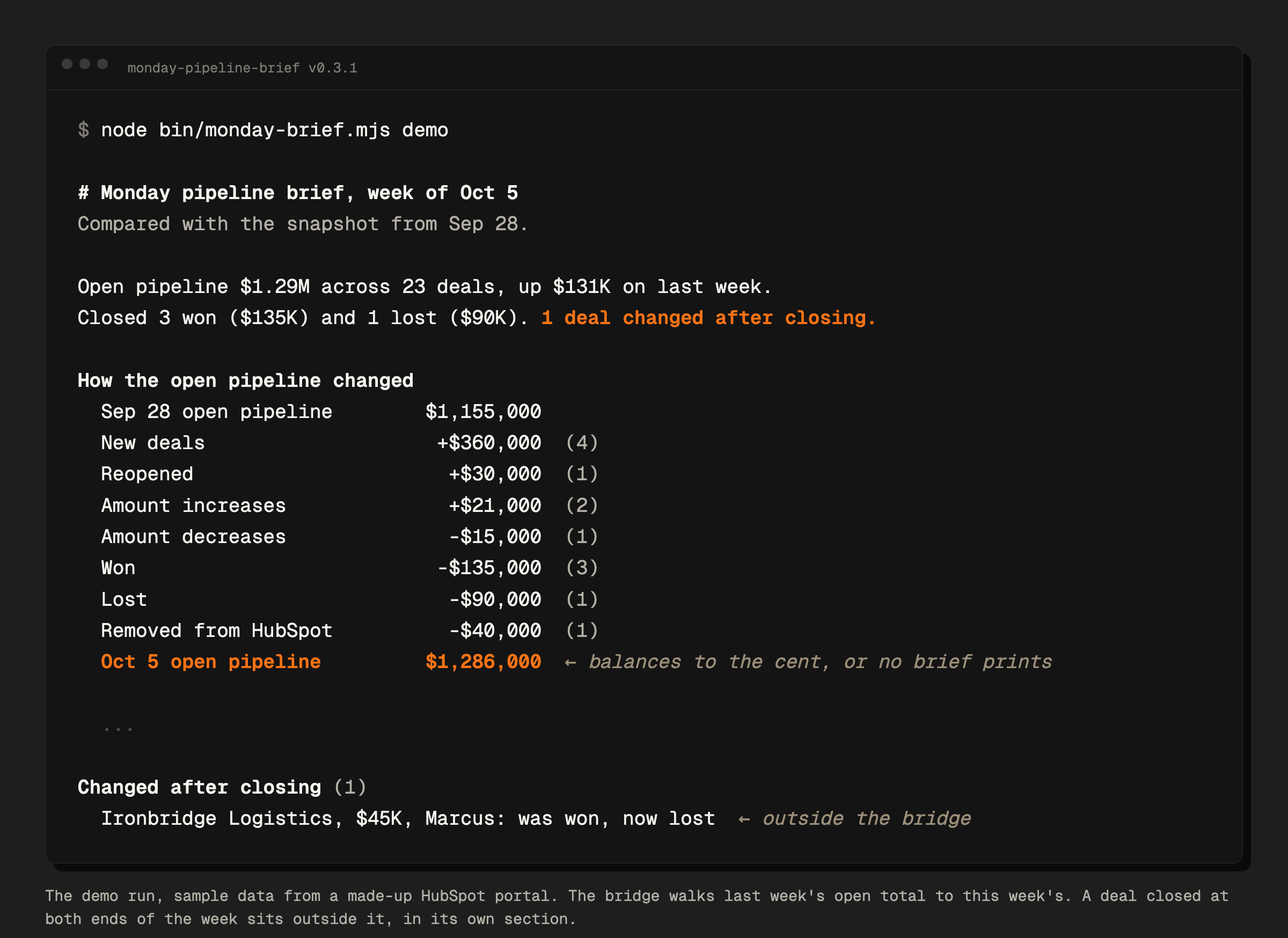
The fix is the oldest move in accounting. Start from last week's open total, add and subtract every reason it changed, and land on this week's total to the cent.
Sep 28 open pipeline     $1,155,000
New deals                 +$360,000 (4)
Reopened                   +$30,000 (1)
Amount increases           +$21,000 (2)
Amount decreases           -$15,000 (1)
Won                       -$135,000 (3)
Lost                       -$90,000 (1)
Removed from HubSpot       -$40,000 (1)
Oct 5 open pipeline      $1,286,000
That bridge comes from the demo pipeline in monday-pipeline-brief, a free tool with made-up companies in its sample data. Every line is backed by a named list of deals further down the brief, each linked to its HubSpot record.
The part that makes it worth trusting is the refusal. When the lines do not add up to this week's total, the tool writes no brief and stops with an error saying so.
The check runs in integer cents, so float rounding cannot knock it out. A test generates 500 random pairs of weekly snapshots and asserts that the bridge lands on every one.
Where does a weekly pipeline diff go wrong?
Five ways, all found in this build. They are the reason the brief is shaped the way it is.
Reading movement from position. The first version decided whether a deal moved forward or back from its stage's place in the pipeline.
When an admin reordered the stages, deals that never moved read as moved. They had stayed put.
A move now counts only when the stage itself changed, and direction is judged from a stage layout stored in every snapshot.
Walking only today's deals. The first version looped over the deals HubSpot returned today. A deal deleted or archived since last week was simply absent, so it left the total with no line, and a deal moved to another pipeline was skipped.
The bridge closes this by construction. Every deal that was open last week and is missing today becomes a "Removed from HubSpot" line with its amount.
Trusting a balanced total to mean nothing was missed. This is the expensive one. Since the first version, a deal that went from won to lost, or whose won amount was edited after it closed, disappeared from the brief.
Reproduced on a $250K deal that flipped from won to lost, the brief printed "Closed 0 won and 0 lost" and "Nothing flagged this week."
The bridge balanced the whole time, correctly. That deal was closed at both ends of the week, so it was never part of the open pipeline. A balance check covers the open pipeline and nothing outside it.
The comparison and the bridge both skipped deals that were already closed, in the same way. Every review before the fix read one pull request's changes, and in each one the two modules agreed with each other.
The first review that read the whole codebase at once found it, after it had shipped in public releases. The brief now has a "Changed after closing" section, kept outside the bridge so the bridge still means exactly one thing.
Checking a rebuild of last week too early. Stored snapshots need a scheduler and two weekly runs before the first real brief. So the tool learned to rebuild last week from HubSpot's property history instead.
The first test of that rebuild passed with zero mismatches. It had run eight seconds before its own test deals were archived. Run again after archiving, it gave seven mismatches.
On that test portal, the call that lists deleted deals returned at most one version of each property. The fix reads the deleted deals by id with their full history.
The rule that came out of it is broader than the fix.
A rebuild of the past earns trust only against a snapshot actually stored at that moment, read through the same path production uses, after the records have aged into the state they will really be in.
Guessing what cannot be rebuilt. HubSpot keeps the newest 20 versions of each deal property, and a merge mixes two deals' histories into one record.
Those deals go into a "Could not rebuild" section that names what is unknown and which records were merged. They get their own bridge line, so the walk still lands on today's total, and the headline says what last week's figure leaves out.
What does the brief put in front of you first?
Below the bridge, the brief lists the few deals worth a look before anything else, and each one says why it is there.
A deal makes that list with two or more warning signs. The signs are a close date that slipped, a move back a stage, a close date already passed, and no next step or no logged activity in 14 days.
One sign is enough when the deal is large, meaning the top 10% of open deals by default, or when its close date slipped into a later quarter.
A $120K deal pushed from October into January shows up there with one warning sign and the reason printed beside it.
The rest follows in plain sections. Slipped, passed, moved back, moved forward, amount changed, new, reopened, closed, changed after closing, removed. Each section shows its ten largest deals and a count of the rest.
Nothing in the brief comes from a model. The diff is deterministic code, so the same two snapshots always produce the same brief.
How do you run it on your own pipeline?
Start with the demo. It needs no HubSpot account and prints the full brief for the made-up pipeline above.
git clone https://github.com/derrtaderr/monday-pipeline-brief
cd monday-pipeline-brief
node bin/monday-brief.mjs demo
Then point it at your own portal. You need Node 20 or newer and a HubSpot service key (or a private app token) with three read scopes, crm.objects.deals.read, crm.objects.owners.read and settings.currencies.read.
export HUBSPOT_TOKEN="your pat- token"
npx github:derrtaderr/monday-pipeline-brief#v0.3.1 run --since 7d
--since 7d rebuilds your pipeline as it stood seven days ago from HubSpot's property history, so the first run already gives a full brief. It writes nothing to disk unless you add --out brief.md.
To get it in Slack every Monday, set SLACK_WEBHOOK_URL and copy the GitHub Action example in the repo into a repository of your own. It keeps no state between runs.
If you would rather keep your own record, run without --since. That is stored mode, which saves a snapshot to your own disk each week and compares against last week's file.
It runs on your machine or in your own Action, with your key, and talks only to HubSpot and your Slack. MIT licensed, zero dependencies.
What this does not establish
The rebuild from history was checked on one HubSpot test portal with seeded deals, including merges, deletes and deals edited past the 20-version limit. The first version ran once on a real portal with test data.
No outside team has run it on a live pipeline yet, so nothing here says it saves anyone's Monday.
Deals restored from the recycle bin and permanently deleted deals are untested. Stateless mode refuses portals with more than one currency until it has been checked on one. HubSpot only, for now.
What it does hold is a contract you can check yourself in a minute. The total explains itself, or the brief does not print.
FAQ
What is a pipeline bridge?
A reconciliation from last week's open pipeline total to this week's. New deals, reopened deals and amount increases add to it. Amount decreases, won, lost and removed deals subtract from it.
Does HubSpot show what changed in the pipeline?
Yes. HubSpot keeps property history on every deal field and has a deal change history report on Sales Hub Pro and above. The brief reads that same property history and arranges it into a walk from last week's total to this week's.
What happens if the bridge does not balance?
No brief is written. The run stops with an error asking you to report it, because an unbalanced bridge means the tool has a bug, and the meeting should never see a number it cannot explain.
Why are deals that change after closing kept outside the bridge?
A deal that was closed last week and is still closed this week was never part of the open pipeline. Folding it into the bridge would make the bridge stop meaning one thing, so it gets its own section and its own line in the headline.
Do I need to store snapshots?
No. run --since 7d rebuilds last week from HubSpot's history and stores nothing. Stored mode exists for portals where history cannot rebuild everything, such as heavy merges or deals edited more than 20 times in a week.
Does it use AI to summarize the pipeline?
No. Every number and every line comes from deterministic code comparing two snapshots.